
HOW TO: Create Your Character on D&D Beyond
A step by step guide on how to build your level 2 hero!
In this blog post, we help you navigate creating a playable character on D&D Beyond. You may use the pre-generated character you played during your level one game or you can pick something else entirely! There is a lot of choices to be made in character creation so take your time and don’t feel pressured to get everything “right.”
Creating Your Character (on D&D Beyond) Within One of Our Campaigns:
When you click on one of campaign link, you will be taken to a page that looks similar to this:
You also have the option to create a “premade character” which are characters that are built out and can then later be customized (we will gladly help you with this!). Keep in mind, these characters are made by D&D Beyond, the Mom’s Basement family has no say or contribution into what they have posted here. This section of the D&D Beyond site is a great resource for finding inspiration and we encourage you to check it out even if you already know you want to go fully custom.
Finally, there will also be a collection of “Available” characters that you can snag. These are characters made by the Mom’s Basement crew and are up for grabs! Silly voices encouraged when playing one of these goofballs!
Going Fully Custom:

You’ll notice a collection of “tabs” at the top of the “Character Builder”
Move through these tabs to make selections that will build out your character in detail.
Below are some suggestions for creating your Mom’s Basement ready (and compliant) hero:
❌ Homebrew (uncheck this option)
✅ When you get to “Ability Scores” select either Standard Array or Point Buy
Your character will automatically start at level one; once you select the “class” you will have the option to adjust the level (see below):
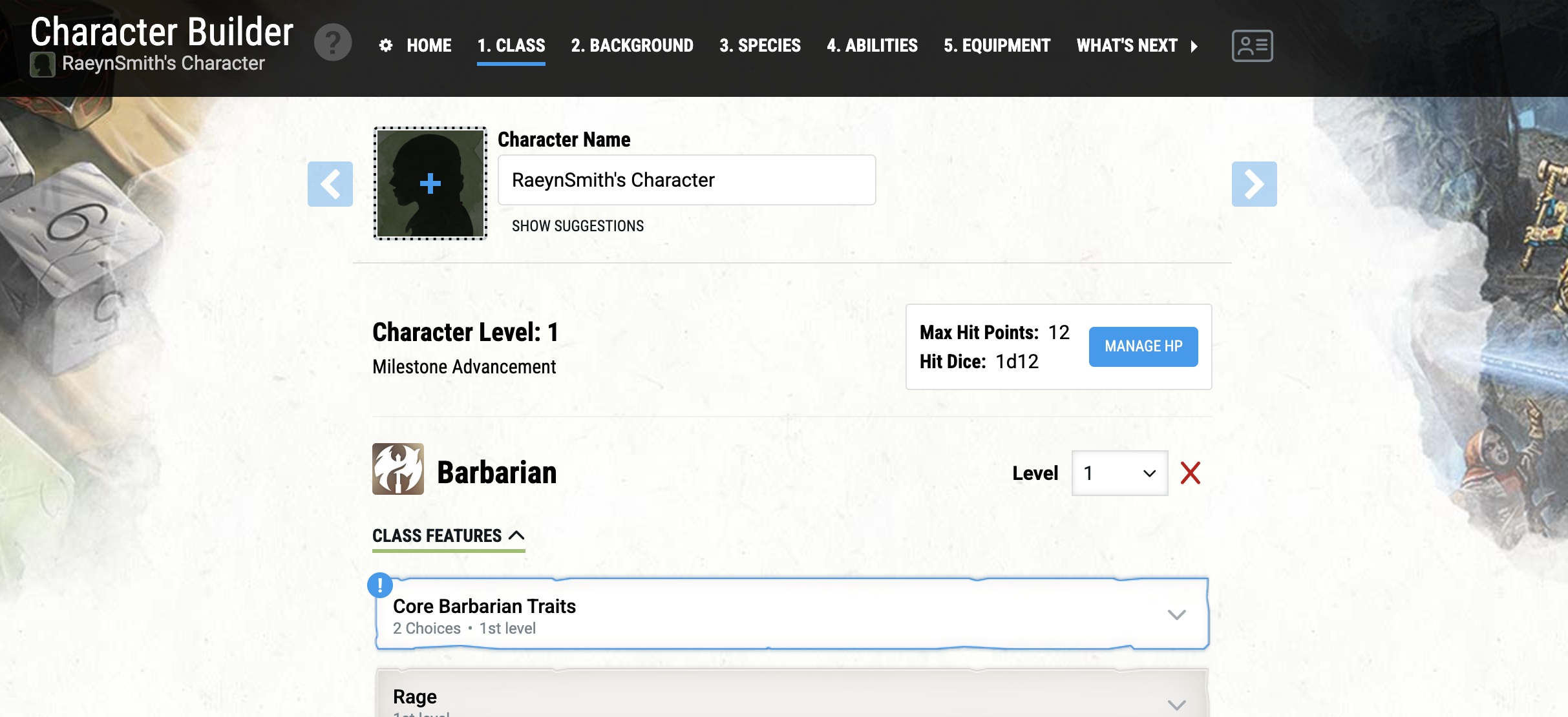
When you “level up” your character, D&D Beyond will automatically increase your HP (hit points), add class features and unlock new abilities
At Level 2, you typically gain:
More HP
New class features
Possibly spell upgrades depending on class
Remember, take your time, there is a lot of choices to be made here (but none of them are permanent). This is where your character can start to get more interesting, develop a personality and you can create a really cool backstory.
Pro Tip: Check Your Equipment!
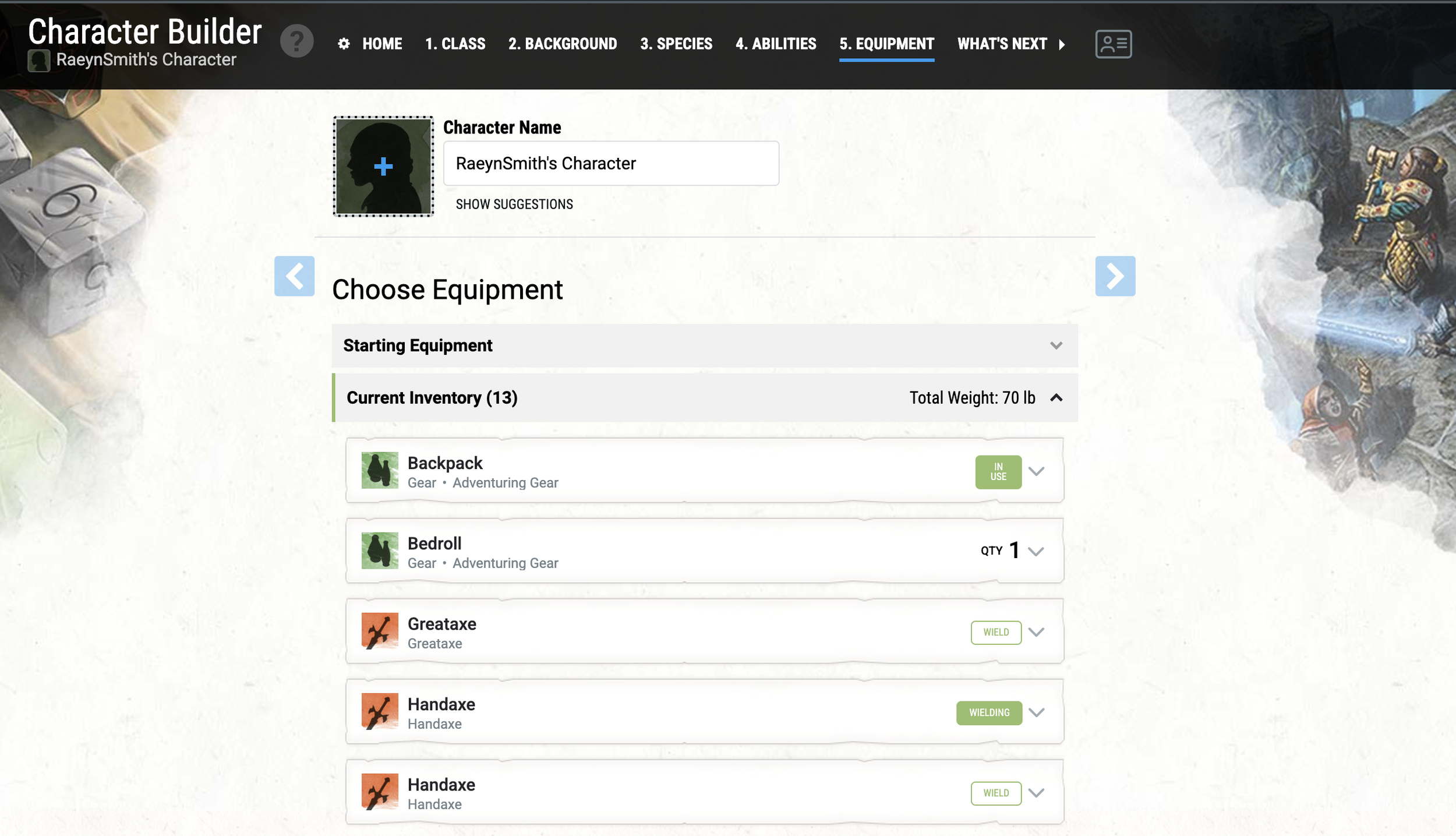
Make sure that you have selected to “use”, “wear”, “wield” or “equip” the items in your inventory. Do this by clicking on the verb on the right hand side of each item (see above — the green items are not “active” and ready to use in game).
HOW TO: Join A Mom’s Basement Campaign on D&D Beyond
A step by step guide on how to build your level 2 hero!
In this blog post, we help you navigate either adding an existing character to one of our D&D Beyond campaigns or creating your character from the campaign launch page.
Joining one of the Mom’s Basement campaigns is not required but it does offer a lot of cool benefits; we have enabled content sharing, which means you dont have to purchase the players handbook and anything we have in our content library is available for you to use too!
This also allows Mom to add magical items, gold, potions and other cool things to your character sheet. Lastly, if you have any trouble or questions along the way in the development and building of your character, hosting your character sheet in our campaigns gives us the ability to help see what you are seeing and walk you through any edits or modifications before or after one of the in-person gaming sessions.
Joining a Mom’s Basement Campaign (on D&D Beyond):
Joining a Mom’s Basement campaign on D&D Beyond will give you access to the 2024 Players Handbook (we bought it and are sharing it with you!) and other source materials. This also gives us the ability to help you build out details in your character upon your request and let’s us add cool loot and magical items to your inventory after a session. This step isn’t required, it’s just a bonus for playing with us.
Join the campaign link to the in-person sessions that attend most regularly:
Tuesday Night D&D at Northeast Pizza KC:
https://www.dndbeyond.com/campaigns/join/76795953801437267
This campaign group meets on Tuesday evenings at Northeast Pizza KC in Pendelton Heights from 6 - 8 PM
2203 Lexington Ave, Kansas City, MO 64124
Thursday Night D&D at City Barrel Waldo/Brookside:
https://www.dndbeyond.com/campaigns/join/75463501283798888
This campaign group meets on Thursday evenings at City Barrel Pizza & Patio in the Waldo/Brookside area from 6 - 8 PM
120 E Gregory Blvd, Kansas City, MO 64114
Depending on if you’ve got a blank slate to work with or you have a library of characters to choose from you will have a few options once you click on one of our campaign links.
You may have a lot of characters to pick from, like the example image of our Northeast Pizza KC campaign page. Or you may have zero characters available if its your first time making a character like the example image of our City Barrel Waldo campaign.
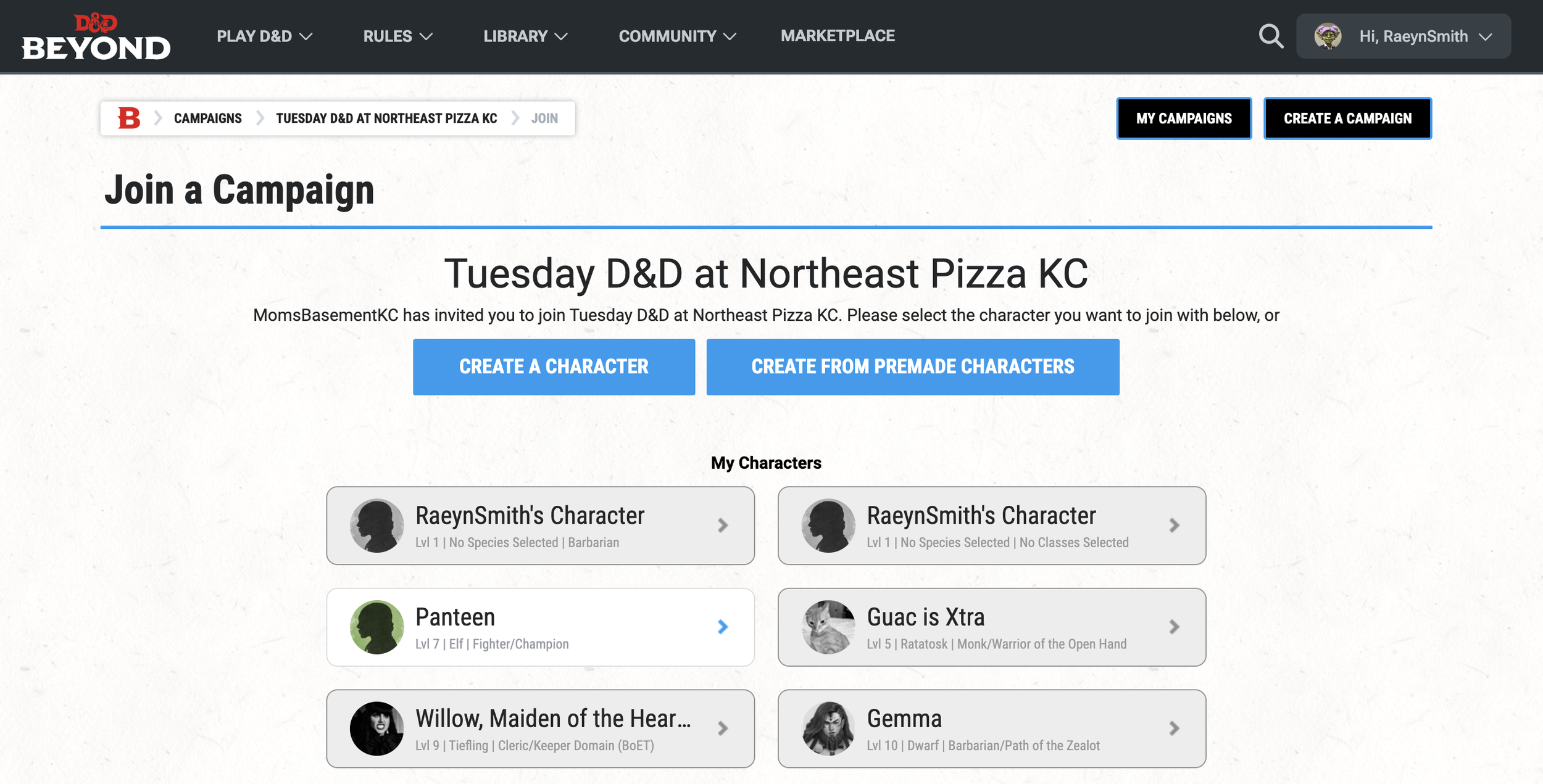
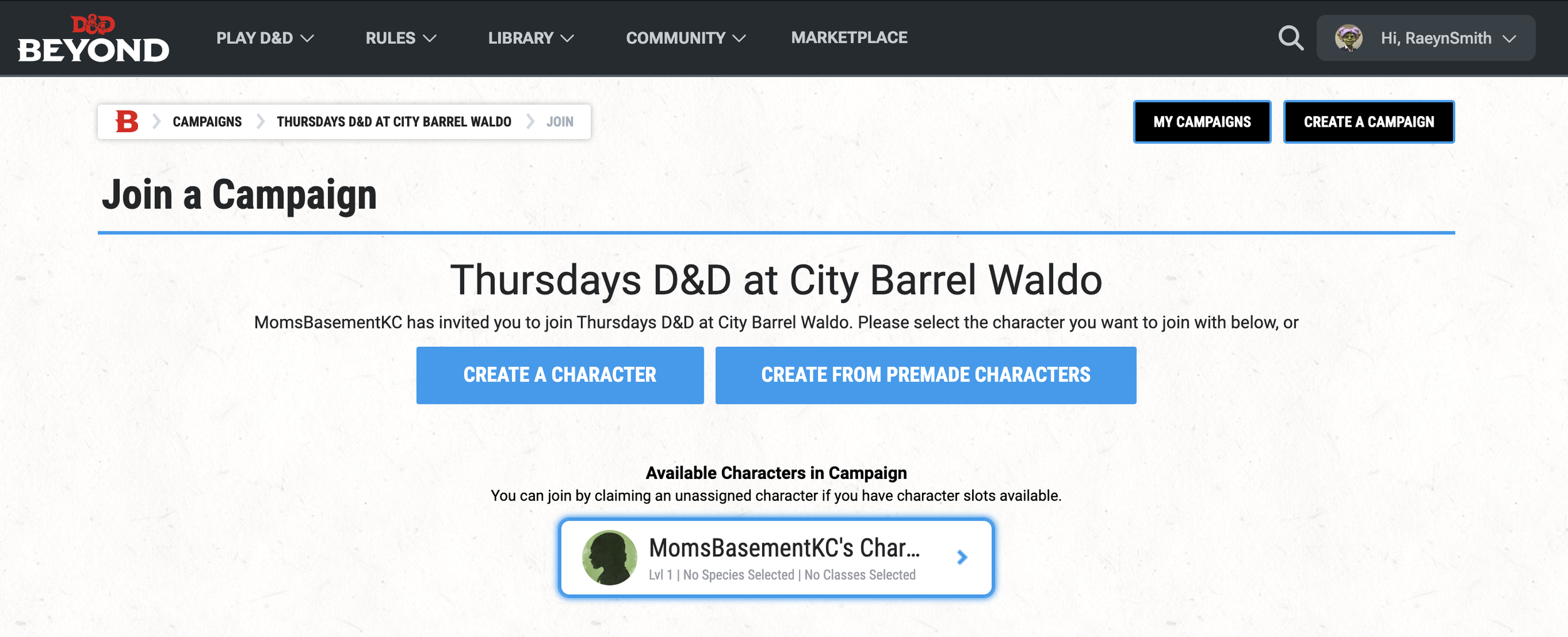
If you have a library of characters; pick the one the you want to bring into the campaign by clicking on the “character sheet” and thats it! You are now in the campaign!
For the remainder of this blog post, we’re going to assume you don’t have a character already created and help you navigate the creation process:
Creating Your Character (on D&D Beyond) Within One of Our Campaigns:
When you click on the campaign link, you will be taken to a page that looks similar to this:
From here you can create a character of your choice. You may use the pre-generated character you played during your level one game or you can pick something else entirely! There is a lot of choices to be made in character creation so take your time and don’t feel pressured to get everything “right.”
You also have the option to create a “premade character” which are characters that are built out and can then later be customized (we will gladly help you with this!). Keep in mind, these characters are made by D&D Beyond, the Mom’s Basement family has no say or contribution into what they have posted here. This section of the D&D Beyond site is a great resource for finding inspiration and we encourage you to check it out even if you already know you want to go fully custom.
Finally, there will also be a collection of “Available” characters that you can snag. These are characters made by the Mom’s Basement crew and are up for grabs! Silly voices encouraged when playing one of these goofballs!
Going Fully Custom:
You’ll notice a collection of “tabs” at the top of the “Character Builder”
Move through these tabs to make selections that will build out your character in detail.
Below are some suggestions for creating your Mom’s Basement ready (and compliant) hero:
❌ Homebrew (uncheck this option)
✅ When you get to “Ability Scores” select either Standard Array or Point Buy
Your character will automatically start at level one; once you select the “class” you will have the option to adjust the level (see below):
When you “level up” your character, D&D Beyond will automatically increase your HP (hit points), add class features and unlock new abilities
At Level 2, you typically gain:
More HP
New class features
Possibly spell upgrades depending on class
Remember, take your time, there is a lot of choices to be made here (but none of them are permanent). This is where your character can start to get more interesting, develop a personality and you can create a really cool backstory.
Pro Tip: Check Your Equipment!
Make sure that you have selected to “use”, “wear”, “wield” or “equip” the items in your inventory. Do this by clicking on the verb on the right hand side of each item (see above — the green items are not “active” and ready to use in game).
HOW TO: Create A D&D Beyond Account
A step by step guide on how to build your level 2 hero!
If you are new to Dungeons & Dragons, it can be pretty overwhelming with so many character creation choices, plus there are dice… stunning, gorgeous, deliciously distracting dice!! We’ve made a series of articles on our blog to help new players navigate the set up process. We hope this helps and if you have questions along the way, leave us a comment on the post and we will do our best to help out!
With that said, for system outages and technical issues on D&D Beyond, you’ll have to connect with those folks as were not directly tied to them in any way. We’re just trying to be helpful!
Creating a D&D Beyond Account:
Head to: https://www.dndbeyond.com
Click on “Sign Up” (top right hand corner)
Choose how you sign up. For example, you can create your account by allowing Google, Twitch, or Apple to do some of the heavy lifting or you can just create an account with your email address and by creating a password.
Enter your info and check your email for a verification
Verify your account
Sweet, now let’s get you added to our Mom’s Basement Campaign (this is optional, but really cool - so eat your vegetables!) and then build your character!